Tech Stumps

  • Home
  • Android
  • iOS
  • Smartphones
  • Tablets
  • Tricks
Showing posts with label India. Show all posts

UIDAI Launched Official Aadhaar app for Android

in: Android Android Apps India Tech News
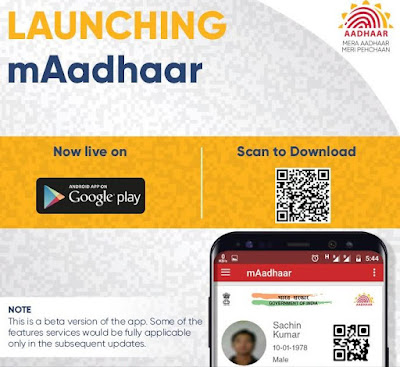
Aadhaar is a unique identity number which is provided to all Indian peoples by the Government and it is maintained by UIDAI. The Unique Identification Authority of India (UIDAI) has released its new official mobile app for Aadhaar number holders. The app is named as mAadhaar and only available for Android smartphones.
UIDAI Launched Official Aadhaar app for Android

mAadhaar app provides demographic information like name, date of birth, gender, address, photograph of user as linked with your Aadhaar number. The app comes with biometric locking system to secure your personal data.

Users have to enter the Aadhaar number to login and then must set up a password for the application. You will get an SMS from your registered mobile number for verification. Every time you have to enter the password for login and you can enable or disable the lock system on the app.

mAadhaar - UIDAI Launched Official Aadhaar app for Android

mAadhaar App Key Features:

  • Aadhaar Number Holder profile download – An easy way to carry your Aadhaar number with all details anytime anywhere
  • Biometric locking/unlocking – you can secure your data and information by biometric locking.
  • TOTP generation – This is Time based One Time Password and it is an automatically generated temporary password which can be used instead of SMS based OTP.
  • Update of profile – You can update your Aadhaar profile data.
  • Sharing of QR code and eKYC data by Aadhaar Number holder
Also See : Now you can Pay EB Bills from your Smartphone app

Important Note: 

If you are already registered mobile number with Aadhaar profile, you can use the mAadhaar mobile application. In case your mobile number not registered, you have to visit the nearest Aadhaar Enrollment centre and update your profile.

Download mAadhaar app

What To Do with your Old Rs.500 and Rs.1000 Rupee Notes

in: India Tech News
Indian Prime Minister Narendra Modi announced an emergency address that 500 and 1000 rupee notes are discontinued in the country from yesterday. This is the decision taken against corruption and black money in India. Government decided to scrap all the Rs.500 and Rs.1000 currency notes. Most of the people using  500 and 1000 notes for hiding as black money are now banned in India, you cannot use the old currency notes anymore.
What To Do with your Old Rs.500 and Rs.1000 Rupee Notes

Deposit your Old Indian Rupee Notes Rs.500 and Rs.1000 in the Banks:

*There is no restriction on depositing 500 rs and 1000 rs in your Bank account. You can deposit any
amount of 500 Rs and 1000 Rs notes without any limit. You can deposit your old rupee notes till December 30 only.
* After December 30, you will be allowed to exchange in RBI offices with special declaration.
* Also there is no restriction on Internet Banking, Demand Drafts and Cheques. So you can use this as much as to exchanging your money with online wallets like Paytm, MobiKwik and more.

What to do with Old 500 and 1000 Rupee Notes

* You can exchange old 500 and 1000 rupee notes in Banks and Post offices till December 30th 2016.
Go to your nearest Bank or Post office with your valid ID Proof such as Aadhaar Card or PAN Card or Voter Identity Card.
 * You have to Fill up a form named as Request Slip with your Name, ID Proof and denomination details.
* The limit for exchanging notes is Rs.4000. So you can exchange currency notes upto Rs.4000.

 Old 500 and 1000 Rupee Notes be accepted in following places till November 11

* Government Hospitals, Petrol Pumps
* Airports, Railway counters, Govt Bus Ticket booking centres
* Govt Authorized Milk booths, Burial Grounds


Deposit your Old Indian Rupee Notes Rs.500 and Rs.1000 in the Banks

 ATM Withdrawal Limit :

* You are only allowed to withdraw Rs.2000 per day and you can withdraw maximum of Rs.20000 per week.
* This ATM Withdraw limit is till November 24th 2016, after the limit will be increased by Government.

Other Important Notes:

* There are no change in available Indian Currency notes except Rs.500 and Rs.1000 notes
* No Toll Entry fee in National Highways till November 11.
* New Currency notes of Rs.500 and Rs.2000 will be introduced from today.
* New Currency notes of Rs.500 and Rs.2000 does not have any chips technology.

5 Best Mobile Apps to Get 2014 Lok Sabha Election Results Live

in: Android Apps Elections India iOS Apps Mobile Apps Tech News
Today is the big day because 2014 lok sabha election results are on the way. All are waiting to know who will be the next Prime Minister of India. Lot of sites available for results but when you are in office or outside you can watch the live results in mobile too. Here are some apps that helps you to know live election results.

5 Best Mobile Apps to Get 2014 Lok Sabha Election Results Live

1. India Elections 2014 

The app is developed by Microsoft for IBN Live News Company and this app extracts data from the Election Commission. You can search your candidates, party or constituencies and more. There is an option save your favorite constituency and get news specific to your favorite constituency. You can view interactive visualizations to monitor results and election analysis. Get this app for Android | iOS | Windows Phone

5 Best Mobile Apps to Get 2014 Lok Sabha Election Results Live
2. Times Now App 

The app is developed Times Now News and it’s called as India’ s Election HQ. You can get the latest headlines and breaking news for this election and also video clips and coverage of live events are available. Get this app for Android | iOS | Windows Phone

Read Also: 5 Best Features of Motorolo E Smartphone [ Moto E Launched for Rs.6999]

3. NexGTv HD app

This is a mobile TV application that provides live streaming of most Indian news channels. You can subscribe a week for Rs.25 but you can get news channels for free including IBN7, Times Now, NDTV profit and DD News. This is a good app to watch election results from multiple sources within your mobile. Get this app for Android | iOS | Windows Phone

5 Best Mobile Apps to Get 2014 Lok Sabha Election Results Live

4. Airtel Pocket TV

Airtel has released a special offer for its Pocket TV app that lets you to watch all Hindi, English news channels for free. But the offer is only valid for Election results day and you have to activate the service by sending a SMS (ADD TV to 54325). Get this app for Android | iOS

Read Also: Airtel Pocket TV App for Android Released with 150 Live Channels

5. Google & YouTube

Google has created its Election Portal to watch live counting and election results for each constituencies. YouTube also launched a channel for live streaming of election results that is partnership with most Indian news channels.

Google Election Portal  |  YouTube Live Coverage

mPassport Seva Mobile App to get Passport information from Smartphones

in: Android Apps India iOS Apps Tech News Windows Phone 8 Apps
mPassport Seva Mobile App to get Passport information from Smartphones The Ministry of External Affairs, Govt of India has launched the mPassport Seva mobile app for all smartphones. It is already released for Android mobiles, now it is also available for iPhone and Windows Phone devices. mPassport Seva app allows Indian citizens to access passport related information from their smartphones.

The application lets you track the status, locating a Passport office and general information on various steps involved in obtaining a passport. Users can search for near Passport Seva Kendra (PSK) or District Passport Cell (DPC) in a district and also search through Pin codes. Users can search for Police stations too. There is an option to track your status of the application by providing File number and date of birth.

mPassport Seva Mobile App to get Passport information from Smartphones

This is one of the largest projects of the Government of India under the National e-Governance Plan (NeGP) being executed in public-private-partnership mode with Tata Consultancy Services (TCS) as the private partner. The feature to applying a new passport from your smartphone will be updated in the coming months.

mPassport Seva Mobile App to get Passport information from Smartphones

mPassport Seva Mobile App Features:

  • Provides information for getting Passports, related services and related phone numbers in case of queries or concerns.
  • Search for Passport Seva Kendra (PSK) and District Passport Cell (DPC) in their districts. Search through Pin codes also.
  • Search for Police Stations as well in certain states and districts
  • Citizens residing abroad also can use Missions/Posts abroad to get address and other relevant information.
  • Fee Calculator helps to find the application fee based on your service and mode.
  • Track your application status and delivery status by providing file number and date of birth.

Download mPassport Seva Mobile app for Android  | iPhone  | Windows Phone

Sygic & MapmyIndia Offline GPS Navigation App available free for Android

in: Android Android Apps India Tech News
Sygic is the most popular offline GPS navigation application in the world and it is now available to download for free. The app is originally costs around Rs.1300 for iOS users and Rs. 199 for Android users. MapmyIndia made its app completely free for Android to compete Google Maps and users can use it for lifetime.

The app does not require an internet connection and it always works with GPS only. The app offers detailed turn-by-turn voice navigation to easily reach your destination. Also it provides support for tablets and smartphones with high resolution display. It comes with lot of new features including offline navigation, travelbook, City guides from Wikipedia and Dynamic lane guidance for unknown roads.

Sygic & MapmyIndia Offline GPS Navigation App for Android

Sygic & MapmyIndia GPS Navigation App Features:

• Works with GPS only, internet is not needed
• Turn-by-Turn voice guided navigation
• Drag & Drop for simple route editing
• Spoken Street Names to focus on the road (in American and British English)
• Three Alternative Routes to choose from
• Waypoints for places you want to visit
• Dynamic Lane Guidance to know the right lane
• Speed Limit Display to protect your wallet

The Sygic & MapmyIndia app is available free on Google Play. After installing the app, you can also download maps for particular cities or states.

Download Sygic & MapmyIndia GPS Navigation App for Android

Flipkart Official Shopping App for Android and iPhone

in: Android Android Apps India iOS Apps Tech News
Flipkart a popular online shopping portal in India has released its mobile application for Android and iOS mobiles. Already Flipkart has unique e-books app for Android, iOS and Windows Phone 8 to purchase e-books. This shopping app lets you to browse and purchase all products of Flipkart website from your Android and iOS smartphones.

Flipkart Official Shopping App for Android and iPhone

The app allows users to search for products, categories or brands through text and it offers voice searching and barcode scanning also. You can filter your search by type, brand, price, discount and more. The app also provides images for each product with zoom facility. There is all type of payment methods are supported such as Cash on Delivery, Credit cards, EMI and netbanking.

Read Also: How to Convert Audio Video Files in Android Phone?

Flipkart Shopping App for Android Features:
  • Easily navigate through different departments to find products
  • Search for products, categories or brands using text, voice or even by barcode
  • Quickly narrow your search using Sort and Filter functions
  • View product image up close with the zoom feature
  • Read reviews that other users have written about different products
  •  Pay by Cash on Delivery, Credit/Debit Cards, EMI and NetBanking
  • Track status of items in your order
  • View recently browsed products and their details even when network not available
  • Share interesting products with friends through SMS, Gmail, Facebook, Twitter, Google+ etc.
  • Access your existing Flipkart account and saved user details

The app is available for free on Google Play Store and iOS store, you can download from below links.

Download Flipkart for Android 
Download Flipkart for iPhone
Older Posts Home
Get Updates in Email. Join with 500+ Readers
  • RSS Feed
  • Twitter
  • Google Plus

Popular Posts

  • How to Install Crystal Reports 9 in Windows 7
  • How to Stop Blogger Blogs Redirection to Country Specific Domains
  • How to Tag your Google+ Friends on Blogger posts
  • Download Angry Birds Rio for PC Completely Free
  • Get 512 GB Online Cloud Storage Free From BeeCloud
  • How to use Twitter within Gmail?
  • CodeTwo Reader: Scan QR Codes on Windows Desktop
  • Contact Us
  • Privacy Policy
  • Sitemap

"© Copyright 2011-16" TechStumps.com · All Rights Reserved ·