Tech Stumps

  • Home
  • Android
  • iOS
  • Smartphones
  • Tablets
  • Tricks
Showing posts with label Tech News. Show all posts

UIDAI Launched Official Aadhaar app for Android

in: Android Android Apps India Tech News
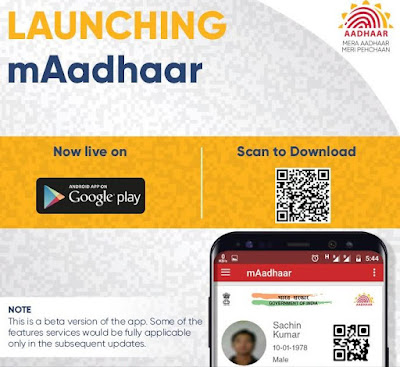
Aadhaar is a unique identity number which is provided to all Indian peoples by the Government and it is maintained by UIDAI. The Unique Identification Authority of India (UIDAI) has released its new official mobile app for Aadhaar number holders. The app is named as mAadhaar and only available for Android smartphones.
UIDAI Launched Official Aadhaar app for Android

mAadhaar app provides demographic information like name, date of birth, gender, address, photograph of user as linked with your Aadhaar number. The app comes with biometric locking system to secure your personal data.

Users have to enter the Aadhaar number to login and then must set up a password for the application. You will get an SMS from your registered mobile number for verification. Every time you have to enter the password for login and you can enable or disable the lock system on the app.

mAadhaar - UIDAI Launched Official Aadhaar app for Android

mAadhaar App Key Features:

  • Aadhaar Number Holder profile download – An easy way to carry your Aadhaar number with all details anytime anywhere
  • Biometric locking/unlocking – you can secure your data and information by biometric locking.
  • TOTP generation – This is Time based One Time Password and it is an automatically generated temporary password which can be used instead of SMS based OTP.
  • Update of profile – You can update your Aadhaar profile data.
  • Sharing of QR code and eKYC data by Aadhaar Number holder
Also See : Now you can Pay EB Bills from your Smartphone app

Important Note: 

If you are already registered mobile number with Aadhaar profile, you can use the mAadhaar mobile application. In case your mobile number not registered, you have to visit the nearest Aadhaar Enrollment centre and update your profile.

Download mAadhaar app

Now you Can Pay EB Bills from your Mobile Phones - Tangedco App

in: Android Android Apps Tamilnadu Tech News
Tamilnadu Government released a new mobile application for paying electricity bills from your smartphone. Tamilnadu Generation and Distribution Corporation ( Tangedco) is already providing online payment method for power bills and now customers have one more easy option of paying power bills.

TN Govt Released an App to Pay EB Bills from your Mobile Phones

TN minister for Electricity, Thangamani launched the Tangedco’s new mobile application at the Tangedco headquarters yesterday. Consumers has so many options to pay EB bills already including Bank counters, Post offices and e-seva centres. With this new addition of mobile payment option, consumers can pay the Electricity bill easily and also faster from their smartphones.

TN Govt Tangedco Mobile app to Pay Electricity Bills

How to Pay TN Electricity Bills from your Mobile

TNEB existing users can use their credentials to login and set the PIN number for their account, while new users have to create a new account using their consumer number, email and mobile number.  Consumers make payments through Net Banking, debit cards and credit cards.  The app offers to view the all bills, Quick Pay for unregistered customers, Bill calculator and more features.

Also See: Moto E4 Plus With Big Battery 5000 mAh Launched for Rs. 9999

TANGEDCO Mobile App Features for Electricity Bill Payment:

  • Check your EB Bill status
  • Pay your Bill
  • Quick Pay Option for unregistered customers
  • View your all Transactions
  • View your Usage
  • Bill Calculator
Download TANGEDCO Mobile App

How to Prevent your Computer from WannaCry Ransom Virus

in: Tech News Tips and Tricks Tricks
Securing your computer is not an easy job nowadays because so many types of viruses spreading daily on the internet world. We know already about basic viruses, malwares, adwares that defects your system and latest one threat is called as Ransom virus.  A massive Ransomware virus named “WannaCry” attacked over 2,00,000 computers across the world in many countries India, Asia, Europe and America.

How to Prevent your Computer from WannaCry Ransom Virus
 What is Ransomware Virus?

Ransomware is a type of malware that targets your computer files, documents such as word, excel, pdf and encrypts them with lock. So you cannot access your files anymore and even you can’t get the files after changing the extension. 

You have to pay some amount of dollars to the Ransom creator to unlock your files. The amount would be 300 dollars to 600 dollars and they will ask the amount in Bitcoin. But you cannot get guarantee of restoration of files even you paid the amount to them.

How to Prevent your Computer from WannaCry Ransom Virus


The latest WannaCry Ransom attacked so many computers in organizations, hospitals, banks and so on in US, UK, France, Germany and India.

See Also: Redmi 4 Smartphone Launched in India for Rs. 6999

How to Prevent WannaCry Ransom Virus?

Prevention is better than cure. So follow these steps to save your computer attacking from any Ransomwares and malwares. Mostly Ransomwares are spreading in the form of Email attachments. 

1.    Don’t click on any links and files on internet unless you know the link is safe
2.    Check twice from downloading email attachments. Check the sender is valid and trusted, sometimes the emails are sent to you professionally such as Invoices.
3.    Update your Windows 7, Windows 8 operating system and Install the security patch files. Keep your system up to date or simply upgrade to Windows 10. If you are using Windows 10 system then you are safe.
4.    Enable your Windows Firewall and block the unwanted ports.
5.    Keep the Antivirus software updated to latest version. Also you can check with Malwarebytes to remove malwares.
6.    Phishing mails – Don’t click on any links on the mail and check the link site is original
7.    Don’t download any Exe files in your email attachments.

Google Launched Areo app for Food Delivery with Home Services in India

in: Android Apps Google Tech News
Google has launched its new app called Area for food delivery and home services in India. Google targets Indian food lovers for online food delivery along with hyper local business like home services. Google Areo app offers users can get food delivery from your favorite restaurants, providers and chefs. Also it provides Home services from local electricians, painters, cleaners, plumbers and more.

Google Launched Areo app for Food Delivery with Home Services

Google Areo app features a lot of service providers including restaurants, chefs, local electricians, painters, cleaners, plumbers and more. You can simply search for your need and order your service like food at your office, cleaner for your home and a plumber for your family member’s home. The app allows users can order to their current address, another address or multiple locations.

Also See: Airtel Internet TV with DTH, 4K Enabled Android Platform Launched

Users can book services and schedule as per their convenient time. The app supports all payment methods including Debit/Credit cards, Net banking and also Cash on delivery. Also it offers Rs.200 discount on food deliveries for a limited period as an introductory offer.  There are many companies already in this business in India and now Google also competing with them such as Zomato,Food Panda, Swiggy and more.  
Google Areo app for Food Delivery with Home Services in India
Google Areo app Features: 

•    Single app for Food delivery and Home services
•    Fast and Easy search by dish or restaurant
•    Filter by Veg and Non-Veg Food options
•    Payment options including Debit/Credit cards, Netbanking and Cash on Delivery
•    Book and schedule your deliveries and services at your convenient time
•    User detailed reviews are all in one place to get good services.

Also See: Youtube Go app to Watch Viedoes with Low Internet

The app is free for all but currently limited to Mumbai and Bengaluru cities only.

Download Areo app

Youtube Go Android app - Watch, Download and Share Videos with Slow Internet

in: Android Apps Tech News YouTube
Google has launched Youtube Go beta app for android to improve Youtube video streaming services in India. In India, the internet connectivity is the main issue because most of the users have low bandwidth internet. Google is focusing users who have slow internet connection and released this new app for them. 

Youtube Go Android app - Watch, Download and Share Videos

Youtube Go app offers you offline video viewing and sharing. The app works with low connectivity and offers related content recommendations and provides social experience.  Youtube Go offers similar to Offline feature on Youtube but it comes with more options. The home screen of the app shows trending and popular videos in your area and community. 

Also See : IPL 2017 Official Broadcasters List - Watch IPL Worldwide

Youtube Go app lets you to view your already saved videos in the Saved Tab. The app will show the preview of the clip by tapping on the thumbnail before saving or watching videos. So you can decide continue watching or closing that video.  You can save the videos with your desired quality according to your internet data. Also you can watch the videos in two qualities such as Basic or Standard quality.

Youtube Go Android app - Watch, Download and Share Videos with Slow Internet

Youtube Go app will indicates the data size of the video to you before saving videos according to the different video resolutions. The app also provides you to share Youtube videos to friends and others without internet connectivity by using Wi-Fi direct sharing.  You can send and received videos offline within the Youtube Go app. The app is now available on Google Play store for all, but now it is in the beta version.

Youtube Go Android App Features :

•    Download and watch your Favorite videos.
•    Share videos to your friends instantly without Internet
•    Search for any video and discover new videos
•    Preview Videos before you watch or download
•    Download videos to your phone or SD Card and watch anytime.
•    Control your Data according to your bandwidth
•    The app size is 8.5 MB only

Download Youtube Go app

Facebook Live Video Feature Now Available for Desktop

in: Facebook Tech News Tips and Tricks
Facebook has rolled out Live Video Streaming feature for desktop users. This feature was already available for only mobile users. Now Facebook allows users can start live video directly from your desktops and laptops.  So you can use live video streaming service from your PC with your webcam. Facebook added a new feature that makes it easy to use streaming software or external hardware when going live from a computer.
Facebook Live Video Feature Now Available for Desktop

Facebook Live feature was available only for Facebook Pages earlier, but now anyone in Facebook can make live video. In the Facebook home page you will see a live video button on your profile in your desktop. This is a easy procedure as like as posting a status on Facebook and the option is available along with Check In, Activities on the NewsFeed.

Also See : Oppo F3 Plus with 16MP+8MP Dual Selfie Cameras For Rs.30900

Also if you are a gamer, you will be able to stream your PC gameplay to your Facebook friends easily. Users can start live recording of game play, tutorials, how-to guides to their friends and followers. Users will be able to share their screens, switch cameras and they can select the option to broadcast videos to Facebook Groups, Events and Pages.
Facebook Live Video Feature Now Available for Desktop

How to Start Facebook Live Video on Desktop PC?

•    Just go to your Facebook Profile or Page
•    In the top of NewsFeed / Timeline you will see the option Live Video along with “Create a Post” section
•    Click on it and go live.

ICICI Bank New Mobile Banking app for Rural Customers with Multilingual Support

in: Android Android Apps Banking Tech News
ICICI Bank has launched new mobile banking application named “Mera iMobile” for rural customers. The app provides the support to access banking services and also agri services for farmers in the rural areas. The aim of the app is to promote digitization in rural areas and the app will be open for all users.  So anyone can use the app even if you don’t have ICICI bank account.  

ICICI Bank New Mobile Banking app for Rural Customers

The Mera iMobile app provides around 135 services and available in English and 11 indian local languages.  ICICI bank customers can avail the features including Kisan Credit Card, Gold Loan, Farm Equipment Loan and Loans to Self-Help Groups. ICICI bank customers in rural areas can check the outstanding loan amount, loan interest, account statement and also banking related services.

Also See :  How to Add / Transfer Money to Paytm Wallet using UPI

Non ICICI bank customers can also download the app and get access to agri-related advices on mandi prices and weather details. The app provides agriculture related details like crop wise mandi prices of nearly 230 crop varieties across 460 mandis. The app also offers taluka wise weather information over 300 districts. These services will help in saving time and farmers can access the services without visiting the branch.
ICICI Bank Mera iMobile app for Rural Customers

The features of the Mera iMobile are:

•    Rural customers can view their Kisan Credit Card, Gold Loan, Tractor Loans & Self Help Group Loans
•    UPI services in 12 local languages.
•    Check your Bank balance and Account Summary.
•    You can do Fund Transfer, Recharge, Bill Payments, Credit Card Payments and more
•    You can use the app even without internet by using SMS services
•    Agricultural Advisory services such as Weather and Mandi Prices inbuilt in the app.
•    View you Retail Loans, Rural loans and Credit Cards under Cards & Loans Section.

Also See : Blogger Introduced New Premium Themes for Blogs

The app is available in 11 regional languages including Tamil, Telugu, Malayalam, Kannada, Marati, Odia,Punjabi, Assamese, Hindi, Bengali and Gujarati.

Download Mera iMobile app

Download Super Mario Run Game for iPhone and iPad

in: Games iOS Apps Tech News
Ninetendo, the creators of Super Mario has released much awaited Super Mario Run game for iPhone and IPad. Previously Ninetendo has announced this classic game at the iPhone 7 launch event.  Most of us played this awesome game on computers and gaming devices in childhood, now you can play this game on your iOS devices. The app is only available for iOS users now, Android app not released yet. Ninetendo stated that Super Mario Android release date will be set for early 2017.

Download Super Mario Run Game for iPhone and iPad

Download Amazon Prime Video Now Available on Android & iOS – Netflix Alternative

in: Amazon Android Apps Tech News
Amazon has launched its Prime Video service in India. Amazon Prime Video lets you stream both Indian and International TV Shows and movies. After huge success of this video on demand service in US and few countries that was launched before five months, now available for Indian users too. Amazon released Prime Video apps available on both Android and iPhone users.

Amazon Prime Video launched in India

Pokemon Go Game Launched in India, Partners with Reliance Jio

in: Android Apps Games iOS Apps Tech News
Pokemon Go game was released  in US and some other countries initially in this year. It becomes the most viral game of this year, most of the smartphone users had to download the game apk file unofficially and played this game. The wait is over. Here is a good news for Indian users, Pokemon Go officially launched in India by Niantic after 5 months.

Pokemon Go game launched in India

What To Do with your Old Rs.500 and Rs.1000 Rupee Notes

in: India Tech News
Indian Prime Minister Narendra Modi announced an emergency address that 500 and 1000 rupee notes are discontinued in the country from yesterday. This is the decision taken against corruption and black money in India. Government decided to scrap all the Rs.500 and Rs.1000 currency notes. Most of the people using  500 and 1000 notes for hiding as black money are now banned in India, you cannot use the old currency notes anymore.
What To Do with your Old Rs.500 and Rs.1000 Rupee Notes

Deposit your Old Indian Rupee Notes Rs.500 and Rs.1000 in the Banks:

*There is no restriction on depositing 500 rs and 1000 rs in your Bank account. You can deposit any
amount of 500 Rs and 1000 Rs notes without any limit. You can deposit your old rupee notes till December 30 only.
* After December 30, you will be allowed to exchange in RBI offices with special declaration.
* Also there is no restriction on Internet Banking, Demand Drafts and Cheques. So you can use this as much as to exchanging your money with online wallets like Paytm, MobiKwik and more.

What to do with Old 500 and 1000 Rupee Notes

* You can exchange old 500 and 1000 rupee notes in Banks and Post offices till December 30th 2016.
Go to your nearest Bank or Post office with your valid ID Proof such as Aadhaar Card or PAN Card or Voter Identity Card.
 * You have to Fill up a form named as Request Slip with your Name, ID Proof and denomination details.
* The limit for exchanging notes is Rs.4000. So you can exchange currency notes upto Rs.4000.

 Old 500 and 1000 Rupee Notes be accepted in following places till November 11

* Government Hospitals, Petrol Pumps
* Airports, Railway counters, Govt Bus Ticket booking centres
* Govt Authorized Milk booths, Burial Grounds


Deposit your Old Indian Rupee Notes Rs.500 and Rs.1000 in the Banks

 ATM Withdrawal Limit :

* You are only allowed to withdraw Rs.2000 per day and you can withdraw maximum of Rs.20000 per week.
* This ATM Withdraw limit is till November 24th 2016, after the limit will be increased by Government.

Other Important Notes:

* There are no change in available Indian Currency notes except Rs.500 and Rs.1000 notes
* No Toll Entry fee in National Highways till November 11.
* New Currency notes of Rs.500 and Rs.2000 will be introduced from today.
* New Currency notes of Rs.500 and Rs.2000 does not have any chips technology.

Windows 10 Officially Released – How to Upgrade your System?

in: Microsoft Tech News Windows
Windows 10 is the most expected operating system from Microsoft is now officially released in 190 countries. After the so many testing and beta releases for a year, the final build of Windows 10 is released. There are lot of new features coming with this version including Cortana digital assistant, Improved Start menu, Edge browser, New Photos, Videos, Maps, Mail & Calendar apps, Windows Hello for secure login and more updates.

Windows 10 Officially Released – How to Upgrade your System?


Windows 10 New Features

• Cortana – Personal digital assistant like Apple’s Siri voice input
• Edge Browser – new faster browser
• Integrated Xbox App
• Continiuum – Optimizes apps across with desktop and touch modes
• Built in apps including Photos, Music, Movies, Maps and more
• Phone Companion app – Enables Android, Windows and iPhone devices to work with Windows 10

Microsoft has already announced that Windows 7 and Windows 8 users can freely upgrade to Windows 10 in the first year of release date without any cost. If you are having original genuine version of Windows 7 or Windows 8, you can now upgrade to the latest Windows 10 system easily from your computer.

Windows 10 comes in different editions that include Windows 10 Home, Windows 10 Pro, Windows 10 Enterprise and Windows 10 Education. If you are using older versions of Windows, you should have to first upgrade to Windows 8.1. Those not eligible to upgrade will pay for $119 for Windows 10 Home and $199 for Windows 10 Pro versions.

How to Upgrade to Windows 10 OS?

Microsoft is rolling out the update gradually in 190 countries, so it may take some time for your system. You can check the update manually through by clicking Control Panel-> Windows Update-> Check Updates. If your system is ready to get update, you will see a new notification on your taskbar will alert when your upgrade is available. Alternatively you can download the Windows 10 ISO files.  If you want to install fresh OS, you will need to enter the Product key.

Also Read: How to Download Windows 10 Setup ISO Files

Top 10 Best New Features of Android 5 Lollipop OS

in: Android Tech News
Google has rolled out Android 5 Lollipop, the latest version of Android and biggest update in the series. Nexus 6 phablet and Nexus 9 tablet was also launched along with Android 5 launch, both the devices coming with Android Lollipop out of the box. This is the major update to the previous version Android 4.4 Kitkat and it comes with some cool new features that is not available in Kitkat. Let’s see what are the new features in Android 5 Lollipop.

Top 10 Best New Features of Android 5 Lollipop OS

1.Material Design - Android 5 comes with a new design called “Material design”, that is a new design with a splash of colors, smooth layers, creative animations, shadows and flatter than ever. This makes your device simple and beautiful and different from previous versions.

2. Improved Notifications – You can view detailed notifications on your lock screen and you can interact, swipe to dismiss, tap to reply easily. You have to just double tap on the screen, then it will automatically unlock and launches the app related to your notification directly.

3. Priority Mode – this is also called as do not disturb, with this you can select which apps only notify your phone. There is also you can set duration for priority mode so you don’t get any notifications for that period from particular apps, which is good for meetings or any special events.

4. Tap and Go – with this feature you can move all of your smartphone’s data to other smartphone. This data transfer works with NFC and you have to pair your phones only. This moves your Google details, configuration settings, apps, widgets, wallpaper and more to the new phone

5. Guest Mode – This is the feature like Windows guest user, you can add your family members, children as guest users of this phone. You have to just create guest profiles after you can limit the information and they can use the phone without affecting your settings.

Also Read: Microsoft Lumia 535 Affordable 5 MP Selfie Smartphone Available for Rs.9199

6. Better Multitasking – This is one of the complicated thing in previous versions and switiching between multiple apps is not easy. Now it is completely changed and called as overview. You can easily scroll through your apps and get more details with card layout.

7. Battery Life prediction – There is two new changes for battery that shows you how much time it would take to charge your phone and how much time is left before the battery runs out. Also you can view the time until the full charge after the power plugged out.

8. Flashlight – with this you don’t need any third party apps for enabling flashlight option. You can just pull down the notification panel to use the flashlight. For this your smartphone has flash LED button.

9. Quick Chromecast access – you can add chromecast device quickly and cast from the notification panel instantly. There is Google’s official app installed for chromecast with this update.

10. Trusted Devices – This option disables your password of your devices or unlock your phone/tablet when it is in particular range of area. You can unlock your devices automatically if you are in home or your place.

Microsoft Live Lock Screen – An Attractive Screen Lock App for Windows Phones

in: Tech News Windows Phone Windows Phone 8 Windows Phone 8 Apps
Do you want to personalize your smartphone’s lock screen? There is lot of lock screen apps available in smartphone world, but if you are a Windows Phone user, here is a lock screen app with attractive designs. Microsoft released live lock screen app for Windows Phone 8 users that lets you to choose different 6 new lock screen layouts.

Microsoft Live Lock Screen App for Windows Phones

Read Also:Nokia Z Launcher App for Android Smartphones 

Each design of lock screen layouts coming with a revamped design and you can customize it for the time, date and notifications. Also you can set a unique unlock animation for each time. There is an option change through multiple background images manually that keeps your lock screen fresh. Finally the app has Bing integration so you can get beautiful Bing Wallpapers that can be downloaded automatically every day.

Microsoft Live Lock Screen App for Windows Phones


Read Also: Xolo Win Tablet with 10.1-inch Display and Windows 8.1OS

Microsoft Live Lock screen app works with all phones even entry level smartphones with 512 MB RAM. This is a beta app however it will be improved in upcoming versions.

Download Microsoft Live Lock Screen App

Download Nokia Z Launcher App Available for Android Smartphones

in: Android Android Apps Nokia Tech News
Last year Microsoft acquired Nokia, the popular mobile manufacturer and it introduced some Android smartphones in the Nokia X series. There are three smartphones in the series including Nokia X, Nokia X+, Nokia XL smartphones that can run Android apps. Now they released a new home launcher app for Android mobiles called Nokia Z Launcher.

Download Nokia Z Launcher App for Android Smartphones

There are so many launcher apps available for Android phones, so let’s see what special features in this app. The app provides simple home screen with less clutter and shows important things only according to your usage pattern and preferences. The app will learn your habits, locations, date time and other priorities and then shows right apps at right time so your home screen changes based on your everyday life.
 Download Nokia Z Launcher App for Android Smartphones
On the top screen, you can see date and time, upcoming events and it have six slots to display your apps, contacts and also web pages too. There is a unique feature in this app called Scribble that lets you to draw a first letter on the home screen and it will filter your apps or contacts quickly beginning with that letter. This feature is not only for apps, you can get results for contacts and other contents also on the phone.

Read Also:Top 5 Mobile Apps to Get Live Updates of FIFA World Cup 2014

Nokia Z launcher is now comes as public beta app and available for all Android smartphones. It comes with new features including faster speed, improved prediction and redefined scribble option.  

Download Nokia Z launcher for Android here
If your phone is not supported by Google Play, However you can download with your Google Id in Nokia's download page

5 Best Mobile Apps to Get 2014 Lok Sabha Election Results Live

in: Android Apps Elections India iOS Apps Mobile Apps Tech News
Today is the big day because 2014 lok sabha election results are on the way. All are waiting to know who will be the next Prime Minister of India. Lot of sites available for results but when you are in office or outside you can watch the live results in mobile too. Here are some apps that helps you to know live election results.

5 Best Mobile Apps to Get 2014 Lok Sabha Election Results Live

1. India Elections 2014 

The app is developed by Microsoft for IBN Live News Company and this app extracts data from the Election Commission. You can search your candidates, party or constituencies and more. There is an option save your favorite constituency and get news specific to your favorite constituency. You can view interactive visualizations to monitor results and election analysis. Get this app for Android | iOS | Windows Phone

5 Best Mobile Apps to Get 2014 Lok Sabha Election Results Live
2. Times Now App 

The app is developed Times Now News and it’s called as India’ s Election HQ. You can get the latest headlines and breaking news for this election and also video clips and coverage of live events are available. Get this app for Android | iOS | Windows Phone

Read Also: 5 Best Features of Motorolo E Smartphone [ Moto E Launched for Rs.6999]

3. NexGTv HD app

This is a mobile TV application that provides live streaming of most Indian news channels. You can subscribe a week for Rs.25 but you can get news channels for free including IBN7, Times Now, NDTV profit and DD News. This is a good app to watch election results from multiple sources within your mobile. Get this app for Android | iOS | Windows Phone

5 Best Mobile Apps to Get 2014 Lok Sabha Election Results Live

4. Airtel Pocket TV

Airtel has released a special offer for its Pocket TV app that lets you to watch all Hindi, English news channels for free. But the offer is only valid for Election results day and you have to activate the service by sending a SMS (ADD TV to 54325). Get this app for Android | iOS

Read Also: Airtel Pocket TV App for Android Released with 150 Live Channels

5. Google & YouTube

Google has created its Election Portal to watch live counting and election results for each constituencies. YouTube also launched a channel for live streaming of election results that is partnership with most Indian news channels.

Google Election Portal  |  YouTube Live Coverage

Airtel Pocket TV App for Android Released with 150 Live Channels Support

in: Android Android Apps Tech News
Airtel Digital TV is the DTH service from Bharti Airtel has launched Airtel Pocket TV mobile application that enables customers to stream and watch favorite TV channels wherever on the go. It offers to watch 150+ live TV channels and also you can watch earlier episodes of 13+ channels, over 10,000 hours library of video content, thousands of videos and movies on your mobile or tablet.

Airtel Pocket TV App for Android - watch live channels

Now you carry only the Pocket TV application with your mobile for watching live channels. Airtel Pocket TV app is now available for an introductory offer of Rs. 60 per month. You can see good streaming quality if you have good 3G or Wi-Fi connection. There is some channels is now limited to existing Airtel Digital TV subscribers and customers only. The app comes with many features including set alarms, filter channels and videos by category.

Airtel Pocket TV App for Android - watch live channels
 
Customers can download the Airtel Digital Pocket TV app that is available for free on Google Play Store. The app is compatible with any smartphone and tablets that run Android version 2.1 and above. Once you have installed the app in your device, you have to activate the service by sending the SMS to 54325 from your registered mobile number.

Also Read :  How to Get Windows 8 Metro User Interface in Windows 7?

Airtel Digital Pocket TV app for Android Features:

  • Live TV: 150+ channels across popular genres
  • Anytime TV: Watch past episodes on 13+ channels
  • Video Library: 10,000+ videos
  • All networks supported: Supports all operator networks
  • Video streaming bitrate dynamically adjusts to the network bandwidth on your device
  • Genre based UI: Filter channels by genre and view videos by genre
  • Search: Find a channel by typing in the name
  • Program Guide: Electronic program guide for one week in advance
  • Recommendation Zone: Get top viewed, newly added and top rated content on the home screen
  • Favorites: Set favorite channels for easy access
  • Social Media Integration: Share the channel you are watching on Facebook
  • Set Alarms: Set program reminders

Download Airtel Pocket TV for Android

Microsoft Released Office for iPad with Word, Excel and Powerpoint

in: IPad iPad apps Microsoft MS-Office Tech News
Microsoft finally released the much awaited MS-Office for iPad and it comes with three separate apps including Word, Excel and Powerpoint. The apps designed especially for touch user interface and also it comes with Ribbon interface similar to Windows desktop version. The iPad version has all the features of desktop version and more than iPhone version.

 Microsoft Released Office for iPad with Word, Excel and Powerpoint

Office for iPad app is free to download and you can view any Office documents and present Powerpoint presentations. But editing and creating documents requires an active Office 365 subscription. The app syncs with OneDrive cloud service so you can access and edit documents from anywhere like PC, tablet and mobiles. You can save and download the documents from the cloud.

  Microsoft Released Office for iPad with Word, Excel and Powerpoint

Also Read:  Microsoft OneNote for Windows goes Free and Mac Client Available

There is also some iOS features packed including voice dictation and Airplay support. Users can get one month free trial and then you have to subscribe for Office 365 to use it. The Office 365 subscription is now available for Rs.420 per month or you can go for Rs.4199 for annual subscription. Microsoft also promised Office for Android will be launched soon.

Download Word for iPad  |  Excel for iPad |  Powerpoint for iPad

Microsoft OneNote for Windows goes Free and Mac Client Available

in: Android Microsoft Tech News Web Services
Microsoft OneNote is a note taking application that always comes with MS-Office suite. Microsoft now separated OneNote application from office pack and made free for the Windows desktop version. It also released Mac OS version and OneNote is now available on all platforms including PC, Mac, Windows Phone, iPhone, Android and the Web. 
Microsoft OneNote for Windows goes Free and Mac Client Available
Microsoft OneNote comes with many new features and provides a cloud API that enables any application to connect to it. So you can capture ideas, informations from more applications and you can access from any device.

 Microsoft OneNote for Windows goes Free and Mac Client Available
Microsoft OneNote Features: 

  • OneNote Clipper for saving web pages to OneNote
  • me@onenote.com for emailing notes to OneNote
  • Office Lens for capturing documents and whiteboards with your Windows Phone
  • Sending blog and news articles to OneNote from Feedly, News360 and Weave
  • Easy document scanning to OneNote with Brother, Doxie Go, Epson, and Neat
  • Writing notes with pen and paper and sending them to OneNote with Livescribe
  • Mobile document scanning to OneNote with Genius Scan and JotNot
  • Having your physical notebooks scanned into OneNote with Mod Notebooks
  • Connecting your world to OneNote with IFTTT
Also Read: Google Launched Android Wear Platform for Smartwatches

Microsoft now comes with full featured services that will surely compete with other note taking apps like Evernote. The free version designed for personal and school use, it’s totally ad-free one. And there is also paid version for Office 365 and Office 2013 customers, the paid version have premium features like SharePoint support, version history, Outlook integration and more.

OneNote free version contains all the core options and your data synced to all devices, so you can access from your phone or tablet too. You can use your 7 GB cloud storage offered by Microsoft OneDrive.

Download Microsoft OneNote

Google Android Wear Platform Released for Smartwatches

in: Android Google Smartwatch Tech News
Google has officially launched Android Wear, a modified Android operating system for wearable devices. Android wear is especially designed for wearable devices and now starts with most familiar wearable device – smart watches. The device is mainly focusing to provide information on the right time when you need it and it will responds to voice commands similar to Google Now.

Google Launched Android Wear Platform for Smartwatches
Android smartphones can be connected easily to get your all phone notifications on the smartwatch. You will get notifications for emails,text messages, voice calls, social updates and other app messages also. Google Now feature is integrated with smartwatches and you can activate the voice input by saying “OK Google” command and get answers for your spoken questions.

Google Launched Android Wear Platform for Smartwatches

Android Wear Features:

  • Get useful information when you need it – Android Wear shows you info and suggestions you need, right when you need them.
  • Receive latest posts and updates from social apps, chats from messing apps, notifications from news apps, social apps and more.
  • Straight answers to spoken questions – Just say “Ok Google” to activate voice input and get answers or perform your works sending text, making a reservation or setting an alarm.
  • Monitor your Health and Fitness – Your favorite fitness apps can give you real-time speed, distance travelled, time information and calories burned and more options on your wrist whether you are cycling, running or walking.
  •  Access and control other devices from your wrist – you can fire up a music playlist on your phone or cast your favorite movie to your TV.

Also Read:Facebook Messenger App gets Free Voice Call Feature in India

Google is already working with some manufacturers including LG, Motorola, Asus, HTC and Samsung to introduce smartwatches powered by Android Wear later this year. According to news, LG G Watch will be the first smartwatch shipped with Android Wear platform. The developers can download a Developer Preview copy of Android Wear and test existing app notifications.
Older Posts Home
Get Updates in Email. Join with 500+ Readers
  • RSS Feed
  • Twitter
  • Google Plus

Popular Posts

  • How to Stop Blogger Blogs Redirection to Country Specific Domains
  • How to Merge All Excel Worksheets with RDBMerge Add-in
  • How to Add Watermark to MS-Word Documents
  • How to Install Crystal Reports 9 in Windows 7
  • How to Download Microsoft Windows 10 Setup ISO Files?
  • Blogger's Default Comment Form Redesigned with New Look
  • How to use Twitter within Gmail?
  • Contact Us
  • Privacy Policy
  • Sitemap

"© Copyright 2011-16" TechStumps.com · All Rights Reserved ·